Twitch Drops
Many games give free in-game items (Rust skins and much more) for watching their streams on Twitch. Twitch Drops earns them for you: for each bot with a connected Twitch account, the server "watches" a drops-enabled stream with no video and claims every reward as soon as it's earned. Nothing plays on your phone or PC. You choose which games: each game is off until you switch it on, and one switch covers all of its drops.
Set it up (once per bot)
- Have a Twitch account (or make one at twitch.tv).
- Link your game account to that Twitch account on the game's drops page. For Rust that's twitch.facepunch.com: sign in with Steam and with Twitch. A drop only reaches a game account that is linked.
- Press Connect Twitch next to the bot, then go to twitch.tv/activate while signed in to your Twitch account and enter the code shown. The page updates by itself once it's done. We never see your Twitch password.
Choose your games
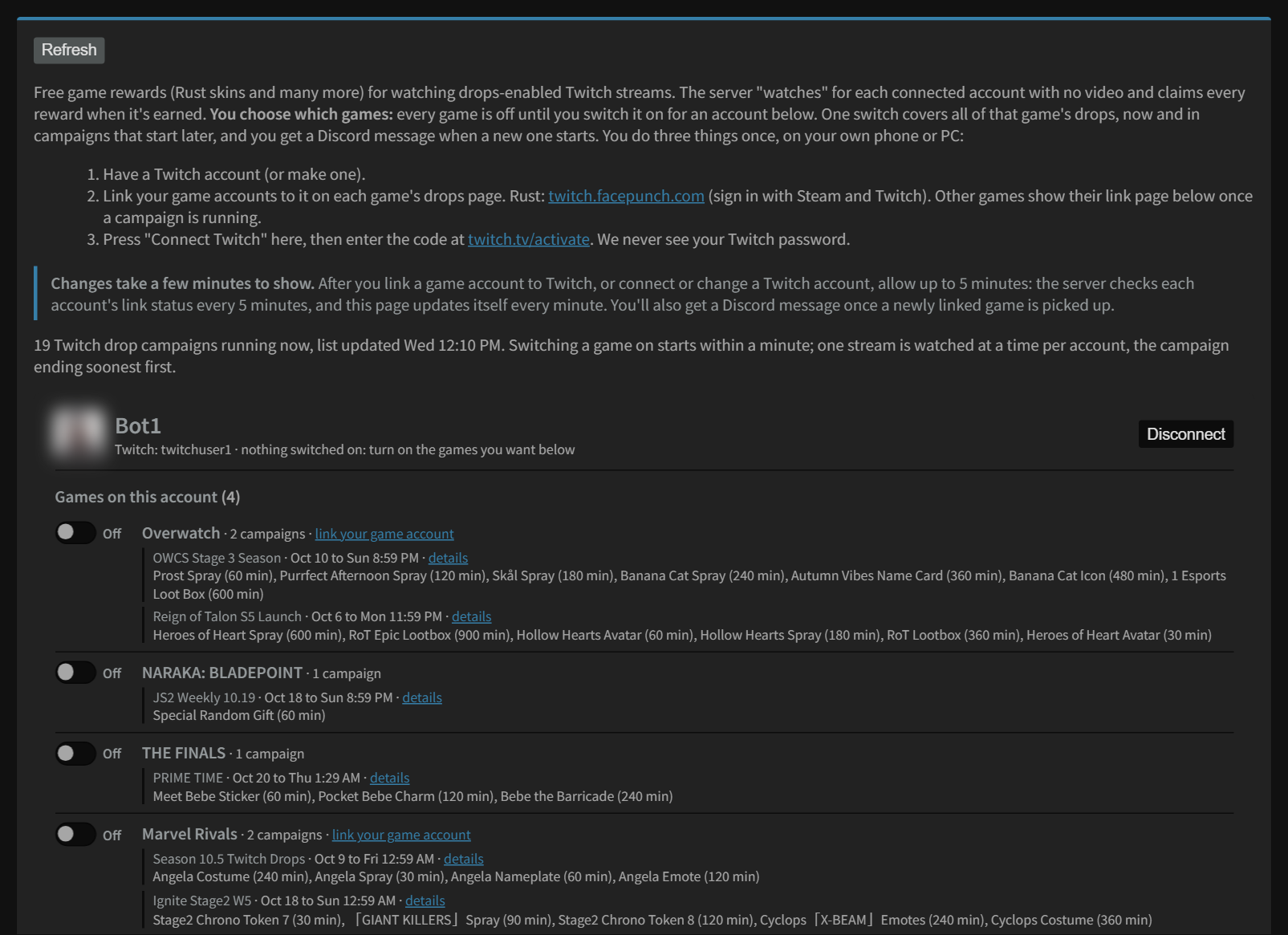
Every game with Twitch drops running right now is listed under each bot with one switch, and that game's campaigns listed under it:
- Games on this account are games the account owns. Other games are the rest; most of their rewards only arrive once you own the game.
- Switch a game on and it collects every drop for that game: the campaigns running now and the ones that start later. It starts within a minute (once Twitch is connected). One stream is watched at a time per account, the campaign ending soonest first.
- Switch it off any time. The minutes already watched are kept by Twitch, so switching it back on carries on where it stopped.
- New campaigns are posted to your Discord channel when they start, with a link straight here. A game you've switched on collects them by itself. Choose which messages you get on the Notifications page.
An account with nothing switched on doesn't contact Twitch at all.
What you'll see
- Earning: the game, the reward, the minutes watched so far out of the minutes it needs, and the stream it's on.
- Running now, but you haven't linked this game's account yet: a campaign is live for a game you haven't linked. Open its link page before the date shown if you want those rewards too.
- Rewards earned, waiting for your game account to be linked: the drops are finished, but Twitch won't hand them over until it sees that game's account linked to the bot's Twitch account. Each game shows the date to link by. Link before then and they're delivered automatically; you also get a Discord reminder 2 days before. After that date Twitch won't hand them over.
- Drops claimed: every reward claimed for that bot, newest first.
- Missed drops: rewards that were earned but lost, because the campaign ended before the game account was linked.
Settings
| Setting | What it does |
|---|---|
| Collect drops | On, or Paused for every bot. Press Save settings. |
| Disconnect | Stops drops for that bot and forgets its Twitch connection. Connect again any time. |
Drops for a game you don't own yet
Games under Other games can be switched on even if the bot doesn't own the game on Steam, so you can collect Rust drops now and buy Rust later (for example in a sale).
- Link first anyway. At twitch.facepunch.com, sign in with Steam and Twitch now. Signing in doesn't need Rust. A drop claimed while the accounts weren't linked can go missing.
- Buy within 180 days. Facepunch only delivers Rust items to a Steam account that owns Rust (family sharing doesn't count), and claimed drops expire 180 days after they were claimed. The page shows how many drops are waiting and the date to buy by.
- One step after buying. The items don't arrive by themselves. When the bot's library shows the game, you get a message: go to twitch.facepunch.com and press Check for Missing Drops.
Good to know
- Changes take up to 5 minutes to show. The server checks each account's link status every 5 minutes, and the page updates itself every minute. When a newly linked game is picked up, you get a Discord message.
- Rewards only reach a game account you've linked. Linking is done on the game's own site, never here.
- If a stream goes offline, or stops counting minutes for 20 minutes, it moves to another stream by itself.
- A drop needs its full time on one campaign (Rust drops often need several hours each), so the first reward can take a while to appear.
Still stuck? Open a ticket in your private Discord channel, or email admin at noggenfogger dot com.