Add a Steam account
Each Steam account runs as one bot. To add one:
- Go to Bots and click Create new bot.
- Fill in the few fields below. Leave everything else as it is.
- Click Create.
- Sign it in.
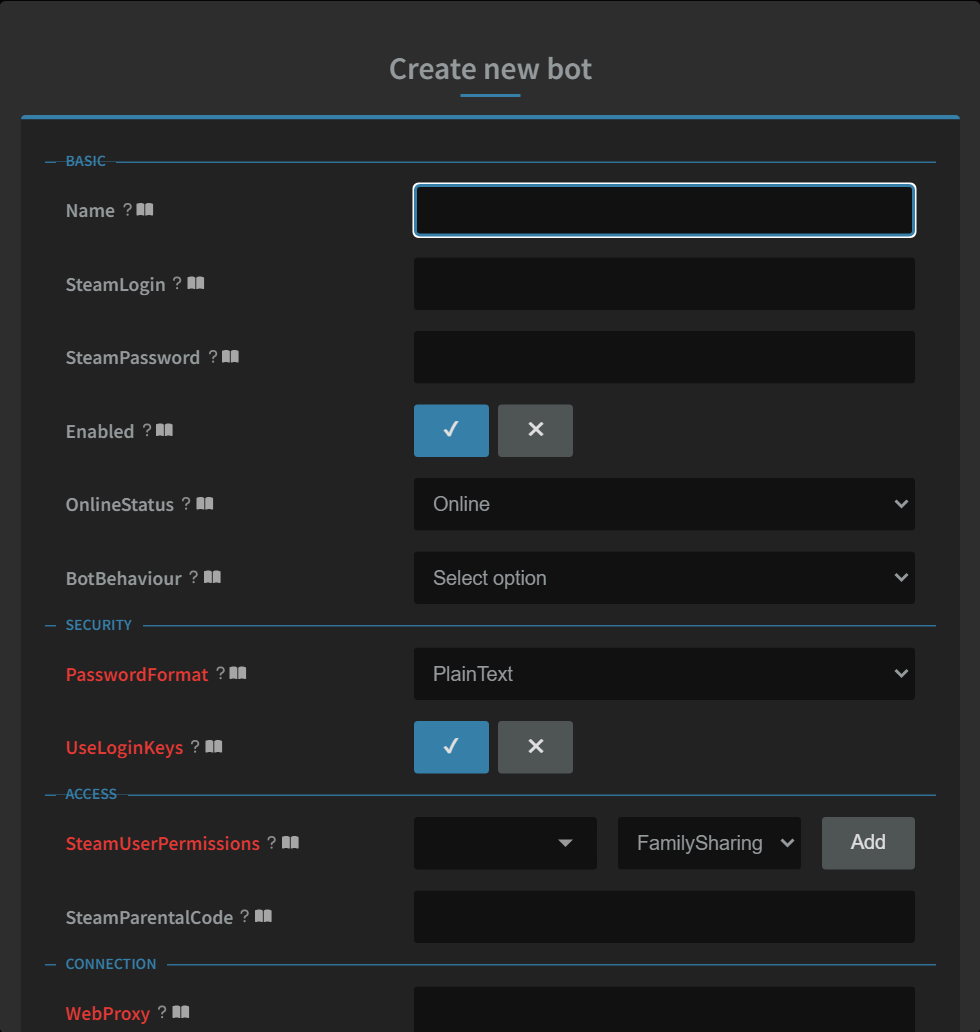
The fields you fill in
| Field | What to put |
|---|---|
| Name | A name for the bot, only for you. Letters, numbers, - and _, no spaces. Example: Juan_Main. Never use the Steam login or email here. |
| SteamLogin | The Steam account name you sign in with. |
| SteamPassword | The Steam password. Optional: if you leave it empty, sign in with a QR code instead. The box shows the password as you type it. |
| Enabled | Already ticked. Leave it on: a bot that isn't enabled never starts. |
That's all. Everything else has a sensible default, and some settings are managed for you.
- Settings with their name in bold red can break sign-in or give items away. Don't change them unless you know why.
- The book icon next to any setting opens its explanation in Help, in a new tab, so nothing you've typed is lost. All of them are in Bot settings explained (in your dashboard's Help).
What happens next
As soon as the bot is signed in, it's set up automatically:
- It plays 24/7 with the free starter pack: 15 of Steam's biggest free games (Counter-Strike 2, Dota 2, PUBG, Apex Legends, Marvel Rivals, Rainbow Six Siege and more), plus the games it owns.
- Free games, free weekends and Steam's daily freebies start within the hour.
- If the profile was never set up, it gets an avatar, a summary, its country and privacy.
- If the profile name gives away the login or email, it's changed to a safe gamer name.
Still stuck? Open a ticket in your private Discord channel, or email admin at noggenfogger dot com.